Lab 2 · Analog Inputs — Reading the Joystick
In this lab you connect the joystick to the Raspberry Pi through the MCP3008 chip and write a program that reads and prints the joystick's position in real time.
Part 1 · Setting up the hardware
The wiring diagram
Connect everything according to the wiring diagram. It is the single source of truth for where every wire goes.
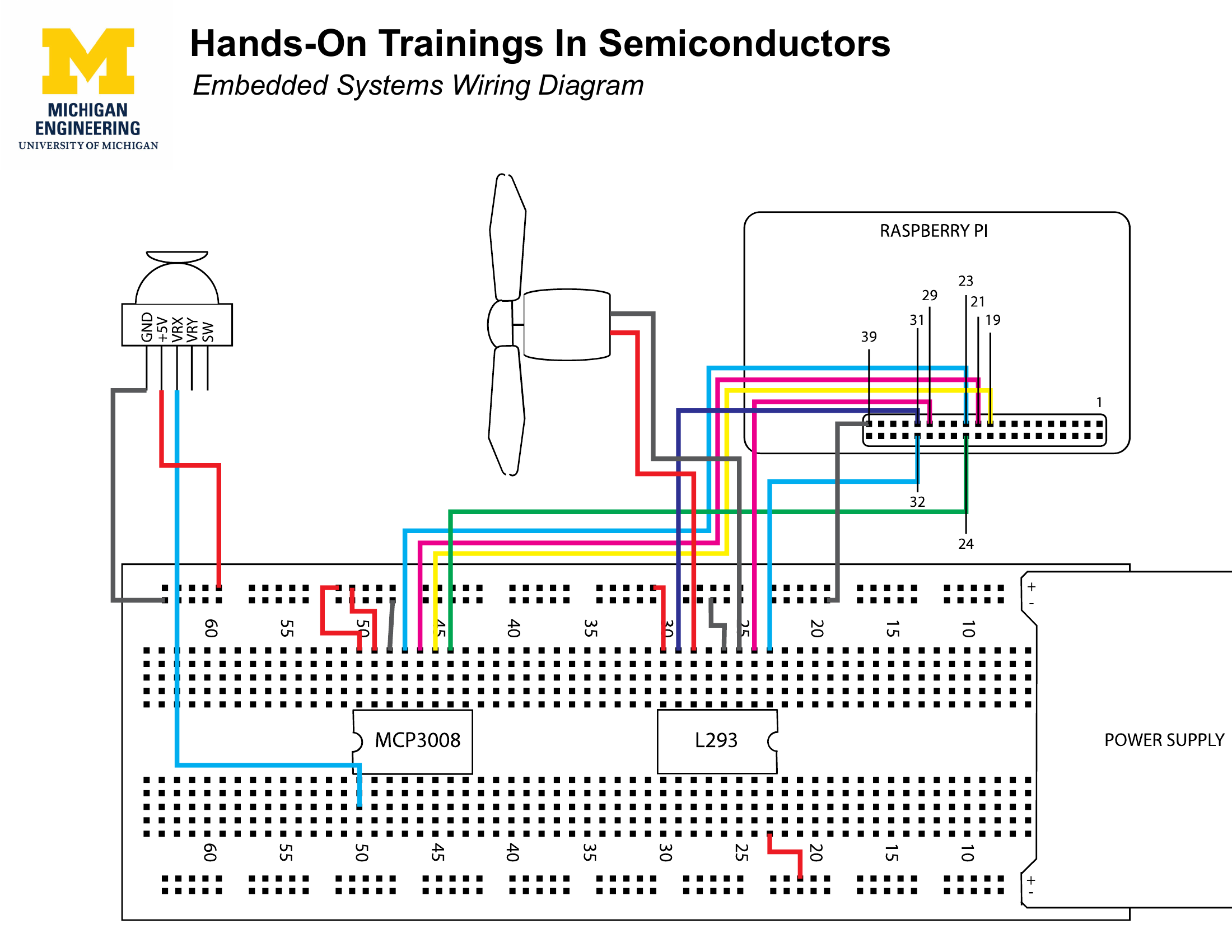
Step 1 · Place the MCP3008
Put the MCP3008 chip on the breadboard so it straddles the center gap, with pins on both sides.
Check the chip's orientation
The MCP3008 has a small semi-circular divot on one end. Make sure it faces the direction shown in the diagram. Inserting it backwards will cause the chip to not work — and may damage it.
Step 2 · Attach the power supply
Place the power supply board on one edge of the breadboard.
Step 3 · Wire everything up
Follow the wiring diagram carefully. Colors of wires do not matter, but positions do. If the diagram shows a wire going from pin 28 on the Pi to the second pin from the left on the top of the MCP3008, yours must do the same.
What is a breadboard?
Think of the breadboard as an extension for the chip's pins — it holds all the wires in place so they do not fall off when the board moves. Each short row of holes is internally connected, so a wire plugged into any hole in a row connects to the chip pin in that same row. See Your toolkit for a full explanation.
Part 2 · Programming the Joystick
You are going to write a program that reads the X-axis position of the joystick and prints it to the terminal.
Step 1 · Open the file
In the terminal:
git reset --hard
This discards any previous edits and restores the original file. See Resetting your work.
Step 2 · Read and print the joystick value
Find the comment in joystick.c that says // Here you'll want to read a value from the joystick and store it in a variable. Your code goes below that line.
You need two things: 1. Read the joystick value and store it in a variable. Which function reads an analog input? Which constant names the joystick X channel? → analogRead() · Pins & constants 2. Print the value so you can see it change. How do you print an integer variable? → Printing with printf
Think before you type
What type should the variable be? analogRead() always returns a value that is zero or positive — does that suggest anything about the type? → Variables & types
Step 3 · Build and run
Move the joystick. The number on screen should change as you move it. If it doesn't, check Troubleshooting.
Bonus · Why does Y always read 0?
You will notice the Y value never changes — it always prints 0. That is a clue, not a bug in your hardware.
Try it
Look at the wiring diagram. Where is the Y-axis wire from the joystick module plugged in on the Pi? What channel number does that correspond to? How would you read that channel? → analogRead()